

 Loading...
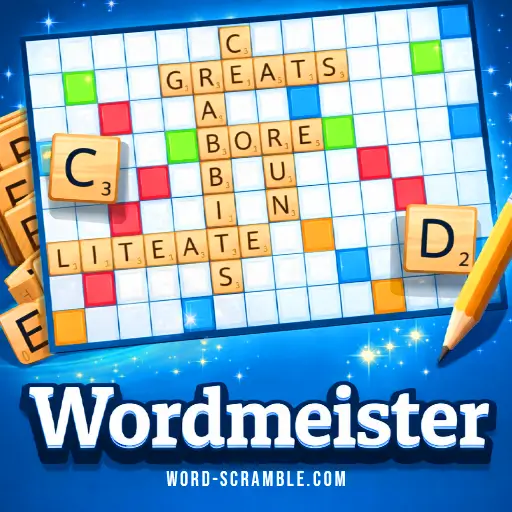





Experience instant fun with Wordmeister, a no-download browser game that lets you play online and expand your vocabulary! This free game offers endless strategic possibilities as you create words on a crossword-style board against a computer opponent. With instant play on Chrome, Safari, and mobile devices, it's perfect for kids and adults alike. Get ready to rack up points and enjoy the adventure of word creation!
Technical Specifications for Wordmeister
| Developer | Unknown |
| Publishing Date | Unknown |
| Main Genre | Word Game |
| Sub-Genre | Strategy |
| Platform | Web Browser (HTML5) |
| Input Method | Mouse, Touch Screen |
| Multiplayer Mode | Single-player, AI Opponent |
| Content Rating | Everyone / ESRB E |
| Tech Stack | HTML5, JavaScript |
| Primary Language | English |
| Installation Required | No (Instant Play) |
A Closer Look at Wordmeister
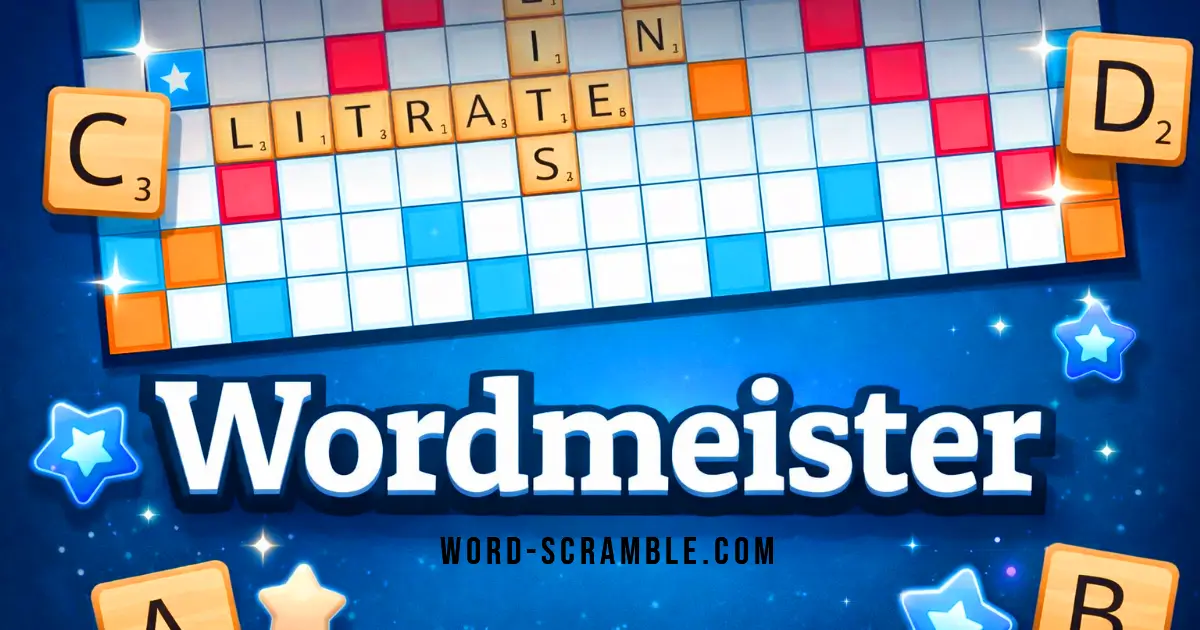
If you’re looking for a fun and engaging way to challenge your brain, then this game is definitely worth your time! It combines the classic word-building mechanics you love with some exciting twists that keep every match fresh and interesting. Imagine forming words on a colorful board while strategically using special tiles to boost your score. Sounds fun, right?
One of the coolest features is the way you can earn points. The longer and more complex your words, the higher your score! Plus, there are different colored squares that can double or even triple your points. It’s like a treasure hunt for words! And if you ever find yourself stuck, you can swap out letters or even skip your turn to think. This flexibility makes it perfect for both beginners and seasoned players.
What really sets this game apart is the chance to play against an intelligent computer opponent. It adapts to your skill level, so you’ll always feel challenged without getting overwhelmed. Plus, with an easy-to-follow tutorial, you’ll be up and running in no time.
So gather your friends or challenge yourself solo—this game is a fantastic way to improve your vocabulary while having a blast. Dive in and see how many points you can score! You might just discover a new favorite pastime.
How Wordmeister Works
Jumping into this game is like stepping into a world of words! You start by getting a random letter, and the fun begins as you lay down tiles to create words. The first player gets to go based on who has the letter that comes first in the alphabet. It’s exciting to see what words you can come up with using your letters!
As you place your letters on the board, you quickly realize that some letters are worth more points than others. This adds a cool twist because you want to think strategically about which words to form. Plus, if you can use those special colored squares, like the blue or red ones, you can double or even triple your score! It feels super rewarding to land on those squares.
If you ever get stuck and can’t think of a word, don’t worry! You have options. You can swap out your letters for new ones or even skip your turn if you need a moment to think. This feature really helps keep the game flowing smoothly and lets you strategize without feeling rushed.
What I love most is how easy it is to track everything. You can see your score and how many tiles are left at a glance, which makes planning your next move much easier. The game even has a helpful tutorial if you're new, so you won’t feel lost when starting out!
Overall, playing is not just about forming words; it’s about being clever with your choices and maximizing your score. Each turn feels like a mini-challenge, and the thrill of seeing how high you can score keeps you coming back for more!
Browser & Device Support for Wordmeister
You can play this game directly in your web browser on desktop, laptop, tablet, or mobile.
Step-by-Step: Getting Started in Wordmeister
Are you ready to dive into the fun world of word creation? Here’s how to get started!
- Start the Game: Click the play button on the welcome screen to begin your adventure.
- Select Your Avatar: Choose one of the 8 avatars to represent you in the game. Four are male and four are female!
- Tutorial Option: Decide if you want to play a quick tutorial to learn the basics or jump right into the game.
- First Move: The game starts with both players getting a letter. The player with the letter that comes first in the alphabet goes first!
- Form Words: Use your letters to create words on the board. You can make words that are two or more letters long.
- Scoring Points: Each letter has a score, and using tricky letters can earn you more points. Check out the colored squares for extra bonuses!
- End of Game: The game ends when there are no tiles left or when neither player can make a word.
Now you're ready to start playing and have fun while testing your vocabulary skills! Enjoy!
Wordmeister Keyboard & Mouse Guide
Understanding the controls is essential for mastering the game. Here’s a comprehensive guide to help you navigate the gameplay effectively:
- Starting the Game:
- Select the play button on the welcome screen to begin.
- Choose an avatar to represent you in the game.
- Decide whether to play the tutorial or jump straight into the game.
- Basic Controls:
- Desktop: Use your mouse to left-click, select, and drag letter tiles to form words.
- Touchscreen Devices: Use your fingers similarly to a mouse for selecting and dragging tiles.
- In-Game Options:
- The upper left corner features a full-screen button that converts to a pause button once the game starts.
- The lower left corner displays how many letter tiles remain and provides options to shuffle tiles or access the tutorial.
- The upper right corner shows current scores and includes a sound control button.
- The lower right corner has buttons to play, swap tiles, or skip your turn. You can swap any number of tiles as long as there are remaining tiles in the bag, but doing so will cost you your turn.
- Advanced Controls:
- You can reposition tiles after placement during your turn, allowing for strategic adjustments based on new letter draws.
- Utilize colored bonus squares on the board for double or triple letter/word scores to maximize points.
Wordmeister Tips & Strategy Guide
Ready to boost your game? Here are some helpful tips and strategies to help you score big and outsmart your opponent!
- Start Strong: Begin your game by placing your first word from the center star tile. This connection gives you a solid start and maximizes your initial points.
- Use Premium Squares: Keep an eye on the colored tiles! Utilize blue and green squares for double or triple letter scores, and orange and red squares for double or triple word scores. These can significantly increase your total points.
- Dynamic Tile Movement: Take advantage of the ability to reposition tiles during your turn. This flexibility allows you to optimize word placement for maximum points based on your new letter draws.
- Word Length Matters: Longer words earn higher scores, so try to create words with more letters whenever possible. Aim for high-value letter combinations like QI, ZA, or JO to really rack up points!
- Utilize Existing Words: Build upon words already on the board. This strategy not only scores you points but can also block your opponent from accessing premium squares.
- Manage Your Rack: Balance vowels and consonants in your hand. Having a mix gives you more options when forming words, making it easier to adapt to the game as it progresses.
- Bingo Bonus: If you can use all 7 of your tiles in one turn, you'll score a bonus of 50 points. Keep an eye out for opportunities to achieve this!
- Defensive Play: Sometimes it's better to block your opponent than to focus solely on scoring points. If you see them heading towards a premium square, consider placing a word that limits their options.
With these strategies in mind, you're all set to enjoy Wordmeister and challenge yourself while having fun! Happy gaming!
Why Wordmeister Stands Out
This game brings a fresh twist to classic word gameplay, making it engaging and fun for players of all ages. Here are some of its standout features:
- Dynamic Tile Movement: You can reposition your tiles during your turn, allowing for flexible strategies that traditional word games don’t offer.
- Colorful Bonus Squares: The board includes special squares that double or triple the value of letters and words, creating opportunities for high scores.
- Interactive Tutorial: A helpful guide walks you through the basics, ensuring you can jump right into the action.
- AI Opponent: Play against an intelligent computer opponent that adapts to your skill level, providing a challenging experience every time.
- Custom Avatars: Choose from a selection of avatars to represent yourself in-game, adding a personal touch.
- Real-time Scoring: Keep track of your points and see how many tiles are left in the bag, helping you strategize your next move.
- Word Validity Check: The game uses a comprehensive dictionary that accepts valid words, ensuring fair play.
- Unlimited Tile Swaps: If you're stuck, you can swap as many tiles as you want (as long as there are tiles left), giving you a chance to rethink your strategy.
Is Wordmeister Actually Good?
Having spent considerable time with this game, I can confidently say that it offers a refreshing twist on traditional word games. With its engaging mechanics and strategic depth, it's a solid choice for word enthusiasts looking for a challenge.
What We Liked:- The dynamic tile movement system allows players to reposition tiles after placement, which adds a layer of strategy not found in many other word games.
- Bonus squares on the board provide exciting opportunities for maximizing points, encouraging players to think critically about word placement.
- The intelligent AI opponent adapts to your skill level, ensuring that each match feels fresh and challenging, which is perfect for solo play.
- An interactive tutorial helps newcomers grasp the rules quickly, making it accessible for players of all ages.
- The game features a large playable dictionary, allowing for a wide variety of words and enhancing the competitive aspect of gameplay.
- While the AI is adaptive, some players may find it can become predictable after several matches, potentially reducing long-term replayability.
- The game can feel a bit overwhelming at first due to its various mechanics and scoring systems, which might deter casual gamers.
If you enjoy word games that require strategic thinking and offer a bit of flexibility, I recommend giving this one a try. It’s a fun way to challenge your vocabulary skills while keeping the gameplay interesting!
Why Players Keep Coming Back to Wordmeister
If you're into word games, this one is a must-try. It’s perfect for casual players who want to sharpen their vocabulary without feeling overwhelmed. You can easily fit in a quick game during your coffee break or dive deeper when you have more time.
What sets it apart from other games is the blend of strategy and simplicity. The unique layout of bonus squares keeps things fresh, and the AI opponent offers a solid challenge without being frustrating. Plus, the ability to swap tiles adds a layer of strategy that you don’t always find in similar games.
Overall, it’s a fun way to engage your brain, whether you’re playing solo or just enjoying some friendly competition.
Games Like Wordmeister
If you enjoy Wordmeister, you might also like these similar word games that challenge your vocabulary and puzzle-solving skills:
FAQs about Wordmeister
Is it free to play?
Yes, it is completely free to play. You can enjoy the game without any downloads or sign-ups.
Does it work on mobile?
Yes, it works on mobile devices. You can play using your touchscreen just like you would with a mouse on a computer.
What type of game is it?
It is a turn-based word game similar to Scrabble. Players create words using letter tiles on a board to score points.
Can I play against a computer?
Yes, you can play against an intelligent AI opponent. This makes it great for practicing your skills.
Are there bonuses in the game?
Yes, there are colored squares that give bonuses. They can double or triple the value of letters or words you create.
How do I start playing?
You start by selecting the play button on the welcome screen. You can also choose an avatar before beginning the game.
Can I swap my letter tiles?
Yes, you can swap your letter tiles during your turn. However, you will lose that turn when you do so.
Is there a tutorial to help me learn?
Yes, there is an interactive tutorial available. It helps you understand how to play and use the game's features.
How do I score points?
You score points by forming valid words with your tiles. The score depends on the letters used and their placement on the board.
Can I use any word in the game?
No, only words from the official Scrabble dictionary are accepted. This keeps the game challenging and fun!
Is there a way to see my score during the game?
Yes, both players' scores are displayed in the top right corner of the screen while you play.
Can I play with friends?
No, this version is designed for single-player gameplay against a computer opponent. However, you can challenge yourself against AI at different skill levels!
Final Verdict: Is Wordmeister Worth It?
Absolutely! Wordmeister is a fantastic way for kids to dive into the world of words while having a blast. With its colorful board and engaging gameplay, it encourages creativity and strategic thinking as players form words and earn points. Plus, the game’s friendly AI opponent makes it perfect for solo play or friendly competitions with friends.
What’s more, the interactive tutorial helps newcomers get started easily, ensuring everyone can join in on the fun. So why not gather your friends and challenge them to a game? You’ll not only expand your vocabulary but also create lasting memories together. Give Wordmeister a try online today, and let the wordplay begin!